
VolumeLock
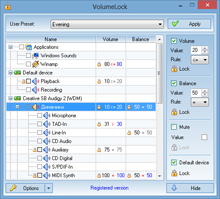
VolumeLock is an easy-to-use audio control utility that gives you the freedom in loudness control. With this program you can guarantee that the volume settings of your PC will never be changed unexpectedly. By creating your own fully customized rules for any volume control, including recording controls, you can prevent other applications from changing your volume settings. VolumeLock includes a powerful lock function, a scheduler, command line support, an ability to store and retrieve a lot of rule configurations via one mouse click or system-wide hot keys. It works with all modern sound cards and can be useful for home and power users alike.
OS: Microsoft Windows 9X/Me/NT4/2000/XP/2003/Vista/7/8/10/11
What Clients Say
Among other things I've done in my life, I've worked as a musician for a videogame company. We made a music game for MTV. So you can bet I know computers and I know sound. More than many folks and perhaps more than is really healthy!
Each program has a volume control... but also assumes I want to change my Windows settings as well. Of course, that isn't the case! I just want to set them and leave them alone. But no... I'm forever having to fiddle and mess about with things. It's a thoroughly pointless waste of time, which should be spent more productively. After all, I have better things to tweak!
The worst culprit of late, is a certain free internet telephone that constantly tries to hijack my volume settings, despite telling it NOT to! It actually moves the sliders on my volume panel and there is nothing I can do to stop it. My favorite music player is equally guilty of this minor but stressful misdemeanor, changing my master volume instead of thinking purely about its own output.
Finally, I decided to do something about this problem. I scoured through a pile of search engine results and found, at length, a download for something called 'Volume Lock'. It does exactly what the name implies.
It locks volume settings exactly where you want them, and even has a variety of 'profiles' for different times and locations. For example, quiet settings for those late night FPS bouts of carnage, or everything muted for complete audio stealth. It's up to you. Set them how you like and store your preferences in a list, for later recall.
The program has a tiny memory footprint, residing in your system tray. It has a wealth of options. It costs very little. And there is a free trial period, so you can put it through its paces before handing over your hard earned savings. You really can't go wrong! Download it and say "goodbye" to annoying volume discrepancies forever! –John Kennedy